
Know your family's whole day before your feet hit the floor.
A done-for-you setup of an AI chief of staff in your family's own account. It reads your calendar, email, and team apps, then hands you one clear plan. Built first for baseball and school families.
Somebody has to piece it all together. Usually it's you.
The schedule doesn't live in one place. It lives in five apps, three inboxes, and a group chat that hit 200 messages while you were at work.
Practice moved, and the update was buried in GroupMe
Team threads move fast. The one message that mattered is somewhere between snack sign-ups and photos.
Two kids, two fields, one car
Game times sit in GameChanger and SportsEngine, school events sit in email, and nobody notices the overlap until Saturday morning.
"What's for dinner?" on a practice night
Planning meals around a schedule that changes every week is its own part-time job, and the grocery list never quite matches.
Forms, fees, and RSVPs that slip
The permission slip, the tournament fee, the reply to the coach. Small things, each easy to forget, and they pile up.
One assistant that reads it all and hands you the plan.
I set it up with you, in your family's own Grok Bot account, connecting each source only with your approval. Here is what it does once it's running.
Connections
- Calendar: your shared family Google Calendar.
- Email: Gmail, including school, team, and Remind mail. It reads and drafts. It doesn't send.
- Team and class apps: GroupMe groups (read-only), GameChanger, and SportsEngine schedules.
- Your stores: grocery lists split by where you shop, like Walmart, Target, and Whole Foods.
What shows up for you
- Morning plan: games, practices, school, and what to know that day on your phone, at a time you pick. Mine lands at 6:24 AM.
- Sunday week-ahead: the whole week laid out so there are no surprises.
- Weekly meal plan: dinners built around practice and game nights, sized for your family, with grocery lists.
- Kids' events and conflict flags: overlapping games, early call times, and parking notes, called out before they catch you.
- Reminders and follow-ups: forms, fees, and RSVPs so nothing slips.
- Draft replies for your OK: it writes the note to the coach or teacher. You approve it, or it doesn't go.
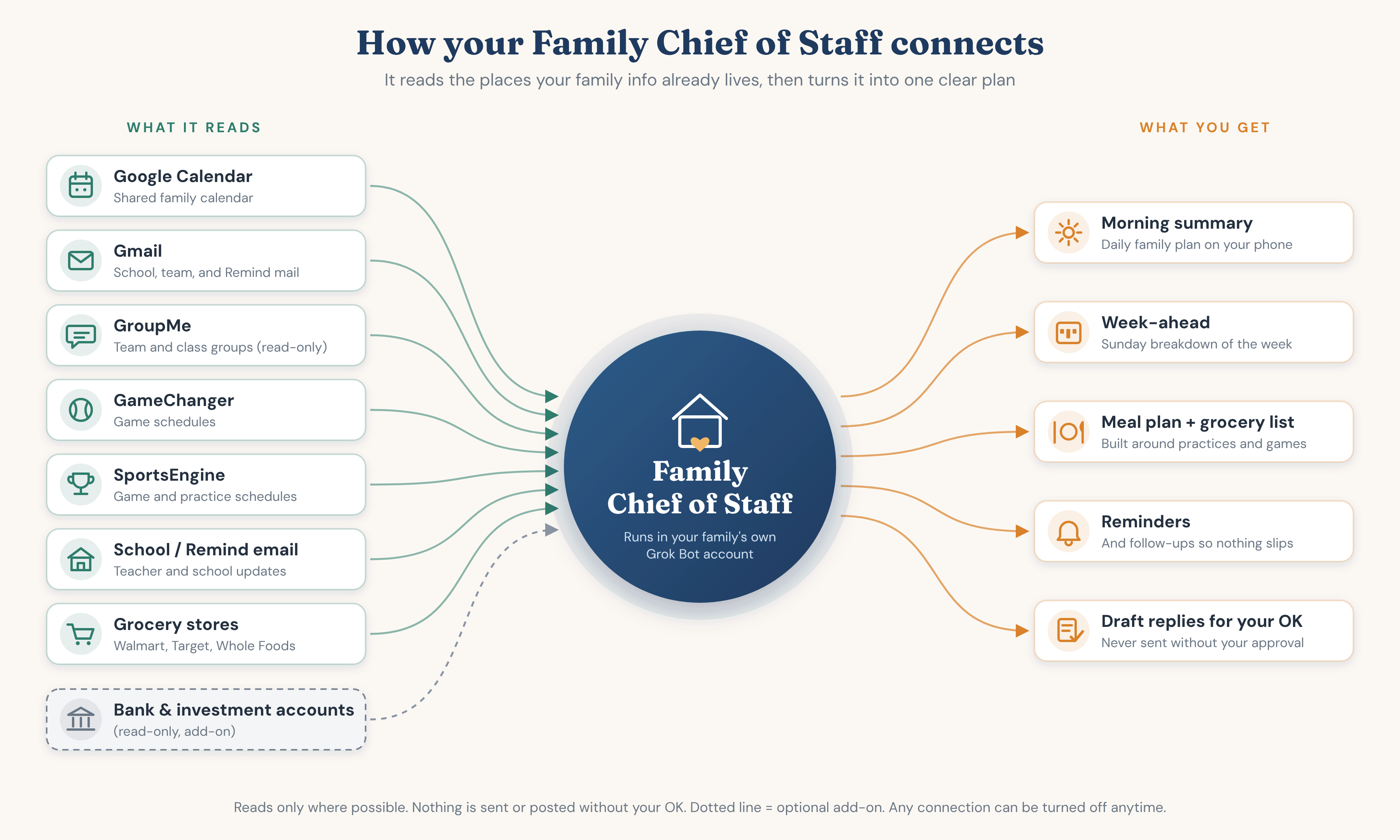
Optional add-on: family finance tracker
- Read-only money tracker: account balances and a spending dashboard you can drill into.
- Kids' accounts: tracking for custodial accounts where you're the account holder.
- Paper-only investing practice (optional): try out ideas with no real money.
- Hard limits: it can never move money, pay bills, transfer funds, or place trades.
Not financial advice. I'm not a licensed financial advisor. This is a read-only view of your own accounts.
You stay in charge
- Everything is a draft until you approve it. Nothing is booked, bought, sent, or posted without your OK.
- It runs in your family's own account, not mine. You type your own passwords.
- Read-only wherever the app allows it, and you can disconnect anything at any time.
- I only have access during setup, and none afterward unless you ask. I don't sell or share anything about your family.
The mental load gets lighter, and nothing slips.
Once it's set up, you stop being the family switchboard. The plan comes to you.
Calmer mornings
Everyone knows the day before breakfast: who goes where, when, and what to bring.
Fewer surprises
Conflicts and changes get flagged early, while there's still time to sort out rides.
Dinner is handled
A plan that fits the week's schedule, and a grocery list that matches it.
Nothing falls through
Forms, fees, and RSVPs get a reminder, and the reply is already drafted.
Your evenings back
Less time scrolling threads and cross-checking apps after the kids are in bed.
Still your call
It does the reading and the first draft. You make every decision that matters.
Three steps, about an hour of your time.
Quick chat
We list what your family uses: calendars, email, school, teams, and stores.
I set it up with you
In your family's own Grok Bot account, connecting each source only with your approval.
Your plan starts showing up
Morning plan, week-ahead, and meal plan. We tweak it until it fits.
Pricing
One-time. Depends on how many kids, teams, and sources. Quoted after our quick chat.
Call-backs, tweaks, or add-ons once setup is done, billed in half-hour blocks. No monthly fee.
The assistant lives in your own account, so the subscription is yours and separate from my setup fee.
Finance tracker add-on: pricing to come.
Good questions to ask
Where does the assistant live?
In your family's own Grok Bot account, not mine. You own the account and the subscription.
Can it send anything on its own?
No. Emails stay drafts until you approve them, and nothing is posted to GroupMe or anywhere else. It's set up so nothing goes out without your OK.
What access do you keep?
None after setup, unless you ask for help. Best practice is that you drive on your own device while I guide you, so you type your own passwords.
Can I turn things off?
Yes. You can disconnect any connection at any time, and cancel your Grok Bot account whenever you want.
What if I need help after setup?
There's no monthly fee. If you want a call-back, a tweak, or an add-on later, it's $250 an hour, billed in half-hour blocks, and only when you ask for it.
What about my kids' information?
The assistant sees school and team info because it reads your calendar and messages. It's your family's account, so that information stays under your control. Grok Bot and each connected app handle data under their own privacy policies.
Want this for your family?
Send me a note, or grab me at the ballpark or school pickup. I'll show you what mine looks like on my phone.